Report templates
Free construction report templates
More than 30 reports used on real sites. Download the ones with a free file, or use any of them on the phone in daftar — filled on site, signed and sent on your letterhead.
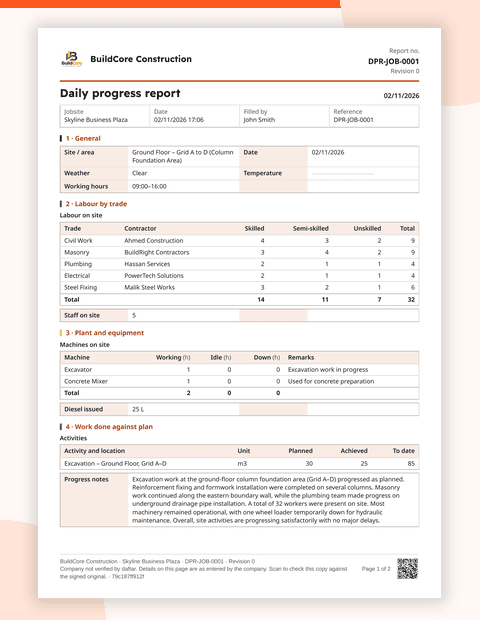
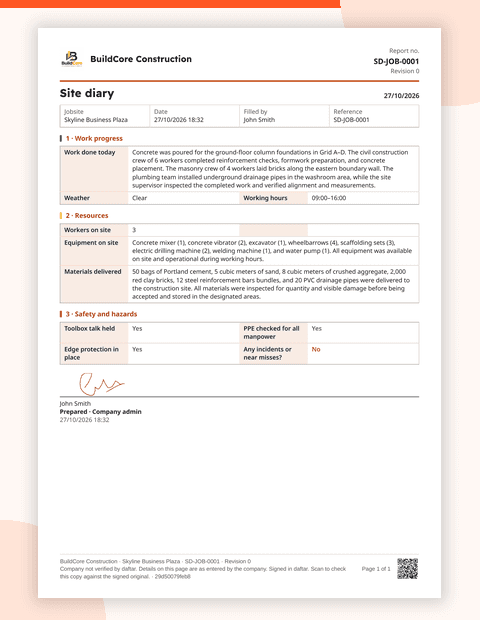
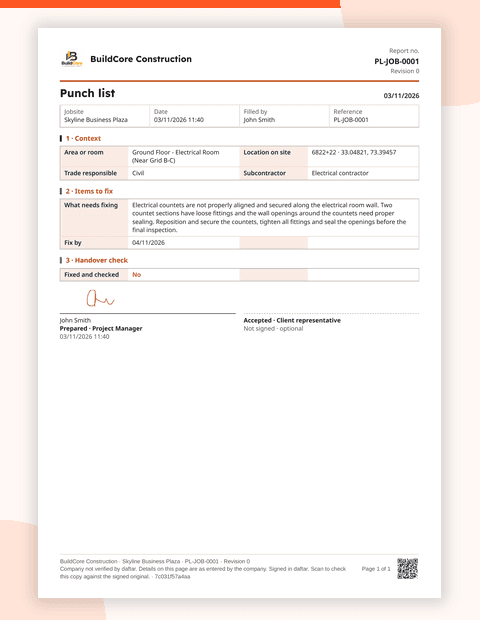
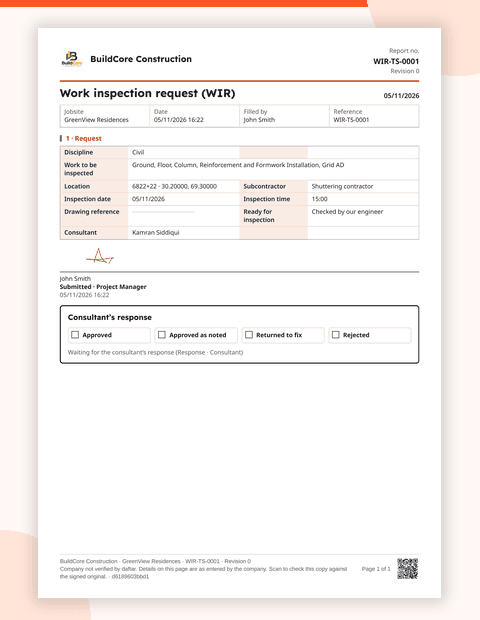
Daily records
- Site diaryFree file
- Daily progress reportFree file
- Weekly progress report
- Daily huddle
- Labour attendance
- Plant and equipment log
- Timesheet
Quality
- Work inspection request (WIR)Free file
- Material inspection request (MIR)
- Non-conformance report (NCR)
- Concrete pour checklist
- Cube test record
- Measurement record
- Punch listFree file
- Handover checklist
Safety
- Toolbox talk
- Permit to work
- Risk assessment
- Daily safety walk
- Scaffold inspection
- Equipment pre-use check
- Incident and near miss
Materials
- Delivery note
- Material request
- Store issue register
- Gate pass
Commercial
- Change order
- Site instruction
- Request for information (RFI)
- Daywork sheet
- Stage payment evidence
- Minutes of meeting
People
- Site induction
- Task
“Free file” marks templates with their own page and download today. Every template is ready to use in daftar.
Which template do you need?
| If you need to… | Use |
|---|---|
| Report today's team numbers, output and delays | Daily progress report |
| Keep a record of events, visitors and instructions | Site diary |
| Ask the consultant to inspect finished work | Work inspection request (WIR) |
| Get delivered materials approved before use | Material inspection request (MIR) |
| Record work that doesn't meet the specification | Non-conformance report (NCR) |
| List defects before handover | Snag list (punch list) |
| Ask a design or contract question | Request for information (RFI) |
| Record extra work for payment | Daywork sheet or change order |
| Brief the team on a safety topic | Toolbox talk |
| Approve high-risk work before it starts | Permit to work |
| Log a delivery against the order | Delivery note |
| Show progress for a stage payment | Stage payment evidence |
Paper, Excel or phone?
Paper works when there's no other option, but photos live elsewhere and nothing can be searched. Excel adds totals, but it's usually filled in the site office at the end of the day — after the details have faded. On the phone, the report is filled where the work happens, photos are attached and stamped, and it reaches the office signed the same day.
Making templates stick across your sites
- Start with three. Daily progress report, site diary and WIR cover most of what a site records. Add others once those are routine.
- Same form on every site. Head office can only compare sites if the fields match.
- Make the key fields required. A report that can be sent half-empty will be.
- Put your letterhead on it. A report the client receives on your letterhead gets read and filed.
- Ask supervisors what to cut. Every field nobody fills is a reason to skip the whole form.
Questions
Are the templates free?
Yes. For templates marked “Free file”, enter your email and we send you the file. Every template is also available in daftar, ready to fill on the phone.
Can I change the fields?
Yes. Add, remove or rename questions, make fields required, and add photos, signatures or calculations.
Can I use my own company forms instead?
Yes. We rebuild your existing forms in daftar during setup, on your letterhead.
Can a client check a report is genuine?
Every daftar PDF carries a QR code. Scanning it confirms the report is real and unchanged.
Your forms, your letterhead
Change any field, make it required, add photos, signatures or calculations.